<?xml version="1.0" encoding="utf-8"?><feed xmlns="http://www.w3.org/2005/Atom" ><generator uri="https://jekyllrb.com/" version="3.10.0">Jekyll</generator><link href="https://gammadb.nuclearphoenix.net/feed.xml" rel="self" type="application/atom+xml" /><link href="https://gammadb.nuclearphoenix.net/" rel="alternate" type="text/html" /><updated>2026-06-17T22:27:29+02:00</updated><id>https://gammadb.nuclearphoenix.net/feed.xml</id><title type="html">Gamma Spectrum DB</title><subtitle>Comprehensive and open database of (common) gamma-ray-emitting radioisotopes and their gamma spectra.</subtitle><author><name>NuclearPhoenix</name></author><entry><title type="html">New commenting feature!</title><link href="https://gammadb.nuclearphoenix.net/update/giscus-comments/" rel="alternate" type="text/html" title="New commenting feature!" /><published>2024-06-10T21:00:00+02:00</published><updated>2024-06-10T21:00:00+02:00</updated><id>https://gammadb.nuclearphoenix.net/update/giscus-comments</id><content type="html" xml:base="https://gammadb.nuclearphoenix.net/update/giscus-comments/"><![CDATA[<p>I have finally looked into how to set up a commenting feature for some pages and here I am now.</p>

<p>This website now uses giscus to offer comments for all of the blog posts and the spectrum pages on here, yay!</p>

<p>Giscus is a very straightforward way to enable commenting on a website and it’s built-in straight to the Jekyll theme I’m using.
It uses my own GitHub repos to store the comments in the repo’s “Discussion” section and you only need a GitHub account to comment.
Just log into the comment section below (one login per website) and you can start writing!</p>

<p>That way, everything is 100% transparent and there is no tracking or ads or anything like that. If you choose to log into your GitHub account to comment, an authentication cookie will be set in your browser for this website only to keep you logged in. That’s it.</p>

<p>Finally I can say: Please let me know what you think of this new feature down below! Cheers!</p>]]></content><author><name>NuclearPhoenix</name></author><category term="update" /><summary type="html"><![CDATA[I have finally looked into how to set up a commenting feature for some pages and here I am now.]]></summary></entry><entry><title type="html">Ready for action!</title><link href="https://gammadb.nuclearphoenix.net/jekyll/update/ready-for-action/" rel="alternate" type="text/html" title="Ready for action!" /><published>2022-08-08T19:07:00+02:00</published><updated>2022-08-08T19:07:00+02:00</updated><id>https://gammadb.nuclearphoenix.net/jekyll/update/ready-for-action</id><content type="html" xml:base="https://gammadb.nuclearphoenix.net/jekyll/update/ready-for-action/"><![CDATA[<p>Most of the work has been done for now. Today I added the last couple of isotopes that I had lying around to the database and finished up all the remaining pages.</p>

<p>You can now browse the database in its (mostly) finished form and look at all the beautiful HPGe spectra. At this point in time all the most commonly used radioisotopes are here as well as a ton of other isotopes mainly used in nuclear medicine.
I hope to expand the scope of the different individual detectors on top of the HPGe detector. This includes, of course, scintillation detectors as they are the only real way for hobbyists and “normal” people to get into gamma spectroscopy. But I need your help with this! I can probably count the amount of isotopes I have lying around and have access to on one hand. In the future I am definitely planning on getting access to some more exciting ones than just Am-241, but for now I need your help. Feel free to add your own spectra to this database!</p>

<h2 id="contributing">Contributing</h2>

<p>You can add to <em>any</em> of the existing radioisotopes if your detector hasn’t been featured there already or if you’re spectrum is in any kind special (like better resolution, less noise, etc.). You can also add an entirely new isotope to the list!</p>

<p>To do so, you only have to provide the energy spectrum files and your detector calibration file. These must be compatible with the <a href="https://spectrum.nuclearphoenix.net">Gamma MCA app</a> as that’s the tool I am using to export the HTML plots. Optionally, you can also include a fitting background spectrum. Unfortunately, simply exporting images of your spectrum is not enough as there are plenty of other static databases and this would also break uniformity in the page. Having a lightweight Javascript plot to look at the spectra is just so much better, even just for the sake of zooming into the image without having to look at a pixelated mess.</p>

<h3 id="compatability">Compatability</h3>

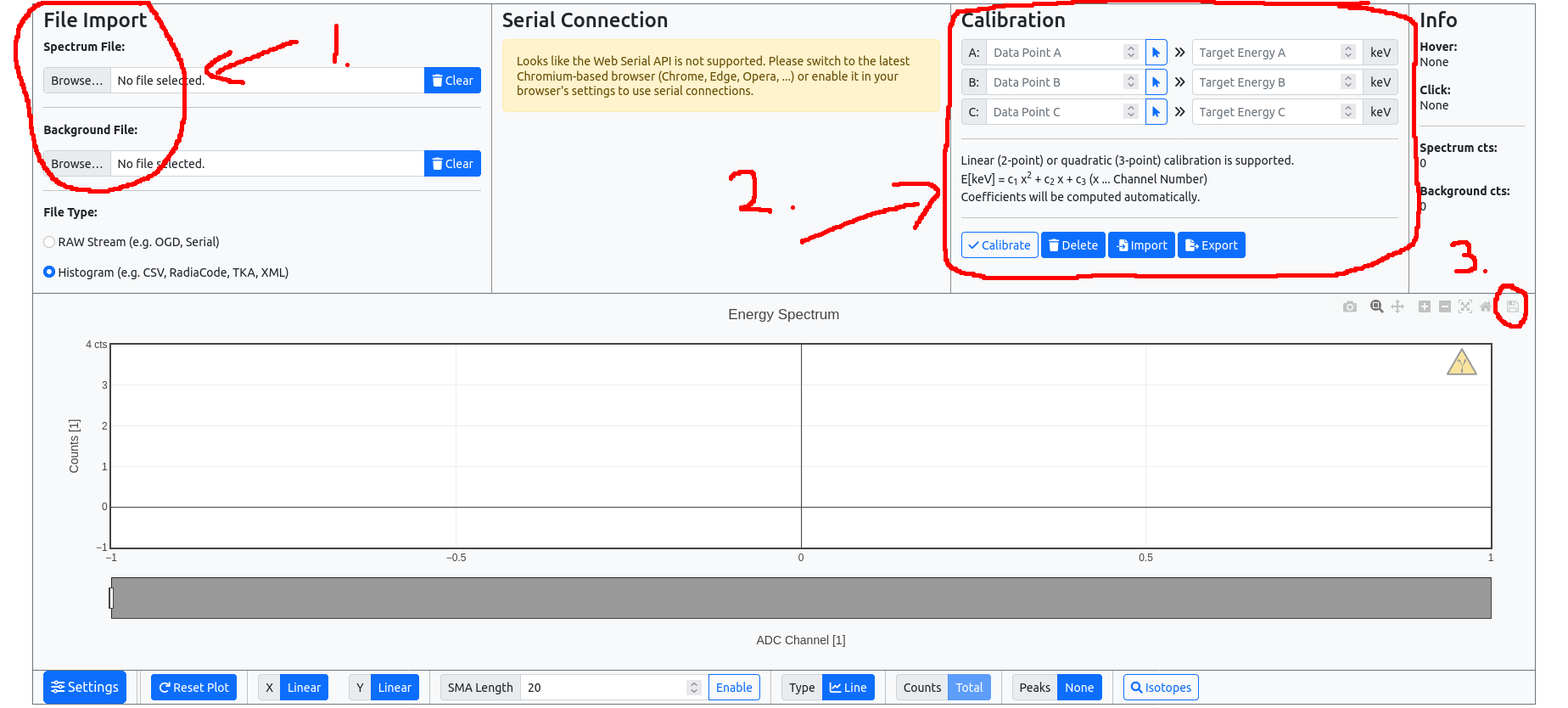
<p>To check file compatability you can do so directly in <a href="https://spectrum.nuclearphoenix.net">Gamma MCA</a>, here’s a screenshot:</p>

<p><img src="/assets/posts/gamma-tut.png" alt="Gamma MCA tutorial" /></p>

<ol>
  <li>Import your energy and background spectrum files. These can be pretty much any common file format, like CSV, TKA, XML, etc. If that works out and you can see your spectrum in the plot below, go to the next step. Otherwise, please submit an issue on GitHub, see below.</li>
  <li>You can do up to a 3-point calibration by selecting points in the plot and assigning the correct energy. This will create a calibration file in the background (don’t forget to hit <code class="language-plaintext highlighter-rouge">Calibrate</code> and check) that you have to export again by simply clicking on <code class="language-plaintext highlighter-rouge">Export</code>.</li>
  <li>This step is optional: If you imported all the files and applied the calibration, you can also directly export the plot as an HTML file by clicking the floppy disk icon. You can attach this too when submitting, but you really don’t have to.</li>
</ol>

<p>Now you should have 2 - 4 files: the energy spectrum, (ideally background,) calibration (and HTML file).</p>

<h3 id="github">GitHub</h3>

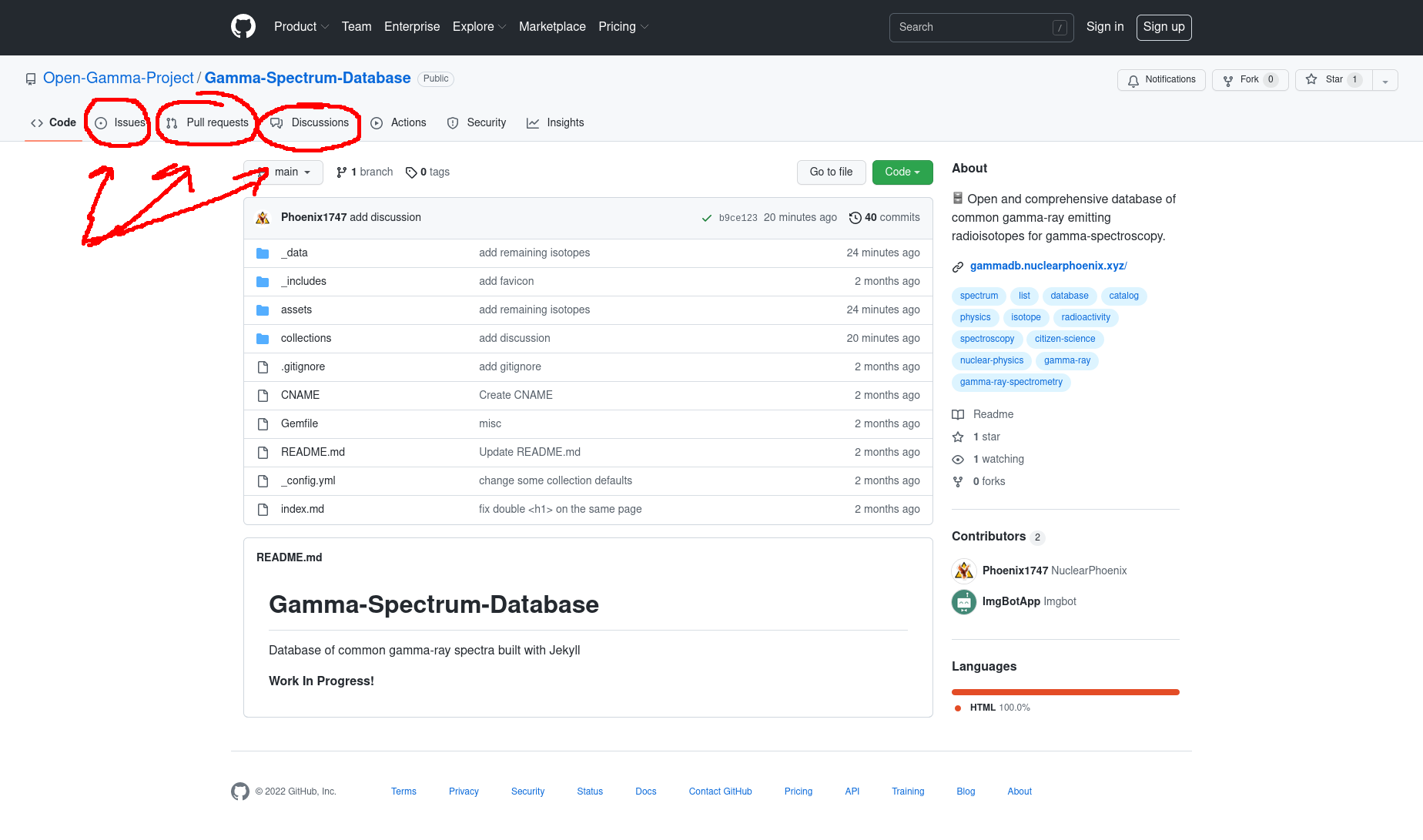
<p>The submission process is pretty straightforward. There are essentially three places for us to interact: issues, pull requests and the discussions.</p>

<p><img src="/assets/posts/github-tut.png" alt="GitHub tutorial" /></p>

<p>If you only want to submit the files you just collected, you will have to create a new issue. Tell us a bit about your setup (detector, scintillator, …), but most importantly what isotopes you measured, in what quantity, for how long and stuff like that. Just some info on top of the raw spectrum that I can add to the plot. Please also tell me if you don’t want to be explicitly mentioned in the database, otherwise I’ll add your username. Lastly, <strong>attach your files to the post</strong>.</p>

<p>That’s it! I’ll reply to you after some time and let you know if we’re ready to go.</p>

<p>If you really don’t want to do all of this via GitHub or simply don’t have an account, you can also send me an email. You can find my contact detail to the left of this post.</p>]]></content><author><name>NuclearPhoenix</name></author><category term="jekyll" /><category term="update" /><category term="contributing" /><category term="jekyll" /><category term="database" /><category term="github" /><summary type="html"><![CDATA[Most of the work has been done for now. Today I added the last couple of isotopes that I had lying around to the database and finished up all the remaining pages.]]></summary></entry><entry><title type="html">Work in Progress!</title><link href="https://gammadb.nuclearphoenix.net/jekyll/update/hello-world/" rel="alternate" type="text/html" title="Work in Progress!" /><published>2022-06-05T12:50:00+02:00</published><updated>2022-06-05T12:50:00+02:00</updated><id>https://gammadb.nuclearphoenix.net/jekyll/update/hello-world</id><content type="html" xml:base="https://gammadb.nuclearphoenix.net/jekyll/update/hello-world/"><![CDATA[<p>You’ll find this post in your <code class="language-plaintext highlighter-rouge">_posts</code> directory. Go ahead and edit it and re-build the site to see your changes. You can rebuild the site in many different ways, but the most common way is to run <code class="language-plaintext highlighter-rouge">jekyll serve</code>, which launches a web server and auto-regenerates your site when a file is updated.</p>

<p>Jekyll requires blog post files to be named according to the following format:</p>

<p><code class="language-plaintext highlighter-rouge">YEAR-MONTH-DAY-title.MARKUP</code></p>

<p>Where <code class="language-plaintext highlighter-rouge">YEAR</code> is a four-digit number, <code class="language-plaintext highlighter-rouge">MONTH</code> and <code class="language-plaintext highlighter-rouge">DAY</code> are both two-digit numbers, and <code class="language-plaintext highlighter-rouge">MARKUP</code> is the file extension representing the format used in the file. After that, include the necessary front matter. Take a look at the source for this post to get an idea about how it works.</p>

<p>Jekyll also offers powerful support for code snippets:</p>

<figure class="highlight"><pre><code class="language-ruby" data-lang="ruby"><span class="k">def</span> <span class="nf">print_hi</span><span class="p">(</span><span class="nb">name</span><span class="p">)</span>
  <span class="nb">puts</span> <span class="s2">"Hi, </span><span class="si">#{</span><span class="nb">name</span><span class="si">}</span><span class="s2">"</span>
<span class="k">end</span>
<span class="n">print_hi</span><span class="p">(</span><span class="s1">'Tom'</span><span class="p">)</span>
<span class="c1">#=&gt; prints 'Hi, Tom' to STDOUT.</span></code></pre></figure>

<p>Check out the <a href="https://jekyllrb.com/docs/home">Jekyll docs</a> for more info on how to get the most out of Jekyll. File all bugs/feature requests at <a href="https://github.com/jekyll/jekyll">Jekyll’s GitHub repo</a>. If you have questions, you can ask them on <a href="https://talk.jekyllrb.com/">Jekyll Talk</a>.</p>]]></content><author><name>NuclearPhoenix</name></author><category term="jekyll" /><category term="update" /><summary type="html"><![CDATA[You’ll find this post in your _posts directory. Go ahead and edit it and re-build the site to see your changes. You can rebuild the site in many different ways, but the most common way is to run jekyll serve, which launches a web server and auto-regenerates your site when a file is updated.]]></summary></entry></feed>